Blog post
I Built a Disk Scanner Because My Mac Ran Out of Space
Published Feb 16, 2025

I Built a Simple Disk Space Scanner
My Mac ran out of storage one day. That caught me off guard.
I don’t keep large video files locally. I don’t store heavy assets on this machine. Still, the system said the disk was full. I opened the storage settings, clicked through the categories, and looked at the colorful chart. It told me something, but not enough to answer a basic question:
Where is the space actually going?
I wanted a clear breakdown by folder, something I could inspect and reason about. So I decided to build a small disk scanner.
Why I built it
There are plenty of disk analysis tools out there, many of them paid. I considered downloading one. But the core idea behind disk scanning felt simple. Walk the filesystem. Sum file sizes. Show the result.
I’ve been learning Rust, and this looked like a good practical project. I also wanted a desktop UI, so I used Tauri as the shell and kept the scanning logic in Rust.
The goal wasn’t to build a commercial-grade replacement for existing tools. I just wanted something I understood end to end.
The first version
The initial mental model was straightforward:
- Read entries in a directory.
- Add up file sizes.
- Recurse into subdirectories and repeat.
Simple and predictable. That was intentional. I wanted a baseline I could trust before adding complexity.
One issue I handled early was symlinks. If you follow symlinks blindly, you can end up in loops or wander outside the folder the user intended to scan. I decided to skip symlinks for size accounting and not traverse them.
With that in place, I had a working scanner. It walked folders, produced totals, and gave me usable output. Error reporting was basic at first. If something failed due to permissions or filesystem quirks, the feedback wasn’t very detailed. But it worked.
Then I noticed something strange.
Sometimes my scanner reported more used space than macOS itself. Not a small rounding error. A meaningful difference.
That meant I was counting something twice.
The hard link problem
I already knew about symlinks. The real issue turned out to be hard links.
A quick refresher:
- A symlink points to another path.
- A hard link is another directory entry for the same underlying file.
If a 10 GB file has two different names in different directories, and you simply sum by walking paths, you might count 10 GB twice. But on disk, there’s still only one 10 GB file.
My scanner was summing paths. The filesystem stores objects.
That mismatch was the bug.
Tracking real file identity
The fix was to stop thinking in terms of paths and start thinking in terms of filesystem identity.
On Unix systems, each file has a device ID and an inode number. Together, they uniquely identify the underlying object.
So I added a set of “seen” identities. When the scanner encounters a file:
- If its (device, inode) pair hasn’t been seen before, add its size and record it.
- If it has been seen, skip counting it again.
I applied similar tracking to directories to avoid odd traversal behavior.
The change wasn’t large in terms of code. But it shifted the model from “count every path” to “count every unique object.”
After that, totals lined up much more closely with what macOS reported. Not byte-for-byte identical in every case, but accurate enough to make decisions.
That was the point.
Turning it into a desktop app
Once the scanning logic felt stable, I wired it into a Tauri app.
The Rust backend handled filesystem traversal and emitted progress updates. The UI subscribed to those events and displayed live scan status, then rendered the final result.
I added:
- A treemap to visualize large folders quickly.
- A file and folder list for drill-down.
- Scan progress and basic scan history so I could compare runs.
Nothing fancy. Just enough to explore disk usage comfortably.
Making it faster
The first implementation was single-threaded. It worked, but large folders took time.
Scanning directories is naturally parallelizable. Each folder can be processed independently. So I redesigned the scanner around a work queue and a fixed number of worker threads.
The flow looks like this:
- Push the root folder into a queue.
- Start a fixed number of worker threads.
- Each worker pulls a folder from the queue.
- It lists entries in that folder.
- For files, collect size and metadata.
- For folders, report them back to be queued.
- For symlinks or special entries, skip.
- The worker sends results to a central manager.
- The manager:
- Deduplicates files using (device, inode).
- Aggregates sizes.
- Pushes discovered subfolders into the queue.
- When no folders remain, a final pass rolls up child sizes into parent folders.
With that change, scans became significantly faster, especially on large directory trees.
What I ended up with
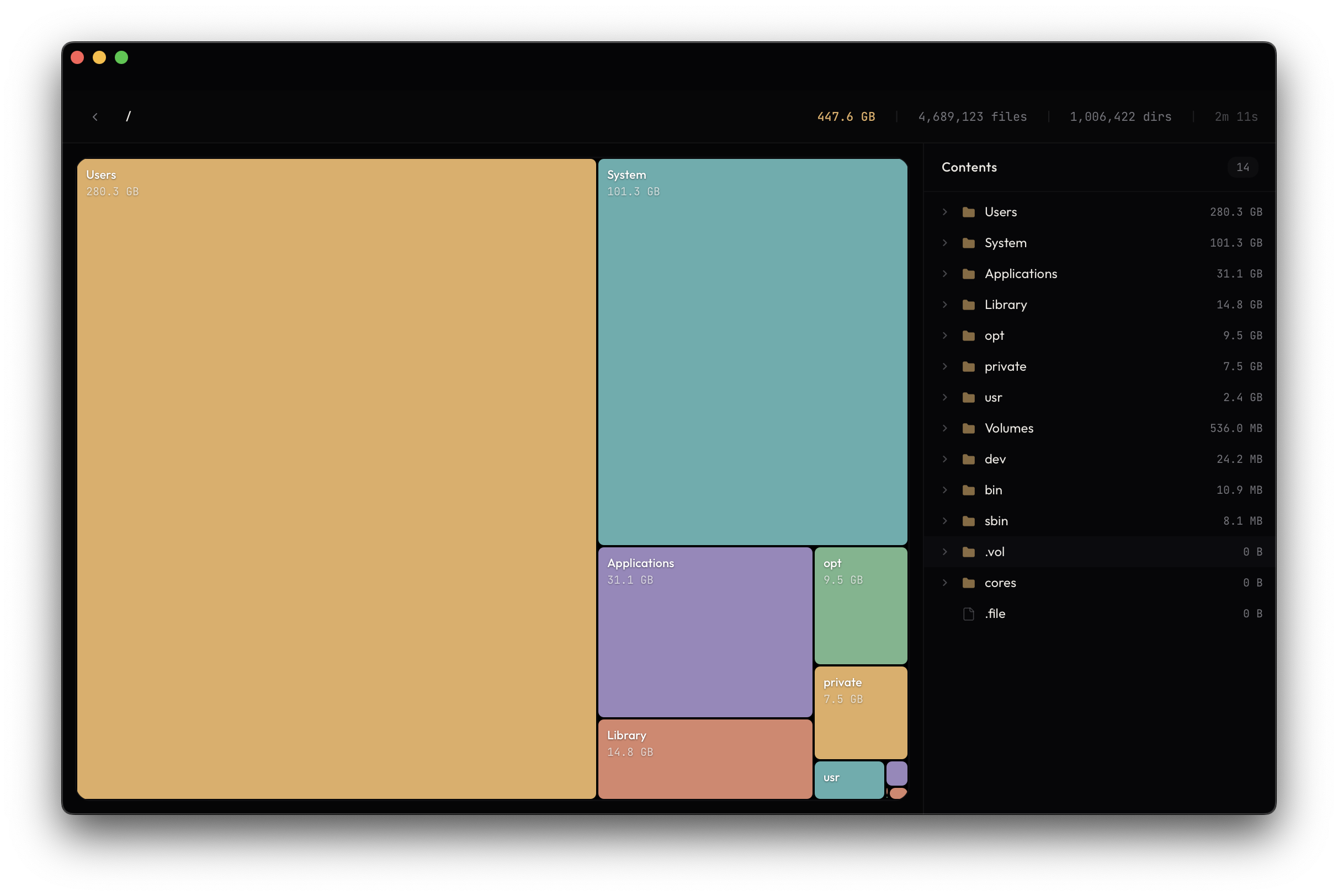
I built a disk space scanner that does what I need.
The useful part wasn’t the UI or even the performance improvements. It was understanding how the filesystem actually represents files, links, and identity. Once I aligned the model with how the OS works, the numbers made sense.
And now when my Mac says it’s out of space, I have a tool that shows me exactly why. (It’s temporary files that were taking up space.)