Project case study
Dodosend
Published Feb 8, 2026

Implementation notes
Dodosend
Why I built this
Dodosend actually started from an older project.
A while ago I worked with a client on an AI-assisted email client called Warmest. The idea was mostly around making email faster to use: good keyboard navigation, quick inbox triage, AI summaries, generated replies, and so on.
I was mainly working on the frontend while the client was handling a few other things at the same time. Eventually his priorities changed, the project slowed down, and we stopped working on it.
Around the same time, AI email clients started appearing everywhere, so there was also less reason to keep pushing that exact product.
But I had already spent quite a lot of time learning how email works, and it felt a bit wasteful to leave all of that knowledge sitting in an abandoned project.
So later I decided to rebuild the idea myself, but this time around what I personally wanted from an email client.
That became Dodosend.
The idea
The main idea behind Dodosend is pretty simple: I wanted to be able to navigate my email fully from the keyboard. with possibility of doing things with mouse kept intact.
And I wanted privacy, so the emails come from gmail api, and land in the user’s device, they don’t stay at our servers.
Architecture
The desktop app is built with Tauri.
I could have used Electron, and for this project I don’t think there is anything important I could do in one that I couldn’t do in the other. I mainly wanted to use Tauri and liked the model of having the desktop shell in Rust without shipping an entire browser runtime with the app.
The backend is written in Go.
Authentication is a small TypeScript service because the auth tooling I wanted to use already worked well there, and I didn’t see much value in rebuilding that part just to keep everything in one language.
I use Postgres for authentication data and for features that don’t naturally belong in Gmail itself, and Redis for the few places where caching or short-lived state makes sense.
The more interesting architecture work, though, is on the client.
Local-first email and synchronization
I wanted the app to feel instant.
Opening a thread, archiving something, moving around the inbox, or performing an action shouldn’t depend on waiting for a Gmail API request every time. So Dodosend keeps a durable local copy of the state it needs and reads from that.
The difficult part is making that local state trustworthy.
Gmail is always the source of truth. The local database is a replica that needs to eventually match Gmail, even if the app crashes, loses its connection, misses a notification, or something strange happens halfway through a sync.
On the first login, I start an initial synchronization of the mailbox.
Right before that starts, I save Gmail’s current history ID. You can basically think of it as a cursor into Gmail’s change history.
The initial sync can take some time, and emails can obviously continue arriving or changing while it runs. Once the initial state has been downloaded, I ask Gmail for everything that changed since the cursor I saved before the sync started and replay those changes locally.
After that, synchronization becomes incremental.
Instead of downloading the mailbox again, the question is basically:
What changed since the last history ID I successfully processed?
I fetch those changes, apply them locally, and only then save the new cursor.
That ordering matters. If the app crashes after receiving a change but before saving the new cursor, it can safely ask for the same changes again when it starts back up. The writes are designed to be idempotent, so replaying something should not corrupt the local state.
Gmail push notifications are also part of this, but I don’t rely on them too much.
A notification only means “something changed”. When one arrives, Dodosend asks Gmail what changed since its last known cursor.
This also means correctness doesn’t depend on receiving every notification. I run the same synchronization when the app starts, when it reconnects, and in a few other places where it makes sense.
Push just makes things faster. Gmail’s history makes them correct.
Local actions
Actions work in the other direction too.
If you archive an email, for example, I save the action locally and immediately update the UI. You shouldn’t have to wait for Gmail before the row disappears from your inbox.
The action is then sent to Gmail in the background, and Gmail’s state eventually comes back through the same synchronization system.
If Gmail rejects the operation, the local optimistic state gets corrected.
This sounds straightforward when written down, but synchronization ended up being one of the parts of the project where a lot of weird edge cases appeared.
One example was email parsing. Every now and then I would find a message with a structure I hadn’t expected and the parser would fail on it. Email has existed for a very long time and there are a lot of strange messages in real inboxes.
Because of things like that, I eventually added what I called a drift check.
Once a day the app compares a snapshot of the local mailbox state with what Gmail reports. It doesn’t automatically overwrite anything. I only use it as a warning system.
If something doesn’t match, I record the problem so I can inspect it in PostHog.
During development this helped me catch several bugs. After fixing those cases, I haven’t seen the check report drift for me or for the people who have been testing the app for a while.
I still keep the check there because synchronization bugs are exactly the kind of bugs I would rather know about before a user notices them.
Keyboard interaction
A big part of Dodosend is the command system.
There is a command palette that changes depending on where you are in the app. Commands that make sense while reading an email are different from the ones that make sense while composing one or looking at the inbox.
When a command also has a direct shortcut, the palette shows it next to the command.
That was intentional. I wanted the command palette to also teach people the application.
I like it to be able to press cmd K and type what’s on my mind and find the action if I forgot how to do it, see the shortcut again, and eventually stop opening the palette for things you do often.
There is also a shortcut sheet on every page that opens with !.
It only shows shortcuts that are relevant to what you are currently doing instead of giving you one huge list for the whole application.
The rest of the navigation follows the same idea. Moving through messages, opening threads, going back, archiving, starring, replying, composing, and switching between parts of the app can all be done without leaving the keyboard.
For composing and replies I use TipTap for the rich text editor.
There is some AI assistance for writing emails as well, but I deliberately kept it limited. I didn’t want Dodosend to become another interface where every action turns into an AI feature.
Scope
I built this version of Dodosend end to end.
That included the product direction, desktop application, interaction model, keyboard system, frontend, synchronization layer, backend services, and the infrastructure around it.
The project became much larger than the original “keyboard email client” idea, mostly because email itself has a surprising amount of complexity once you try to make something reliable enough to actually use every day.
Outcome
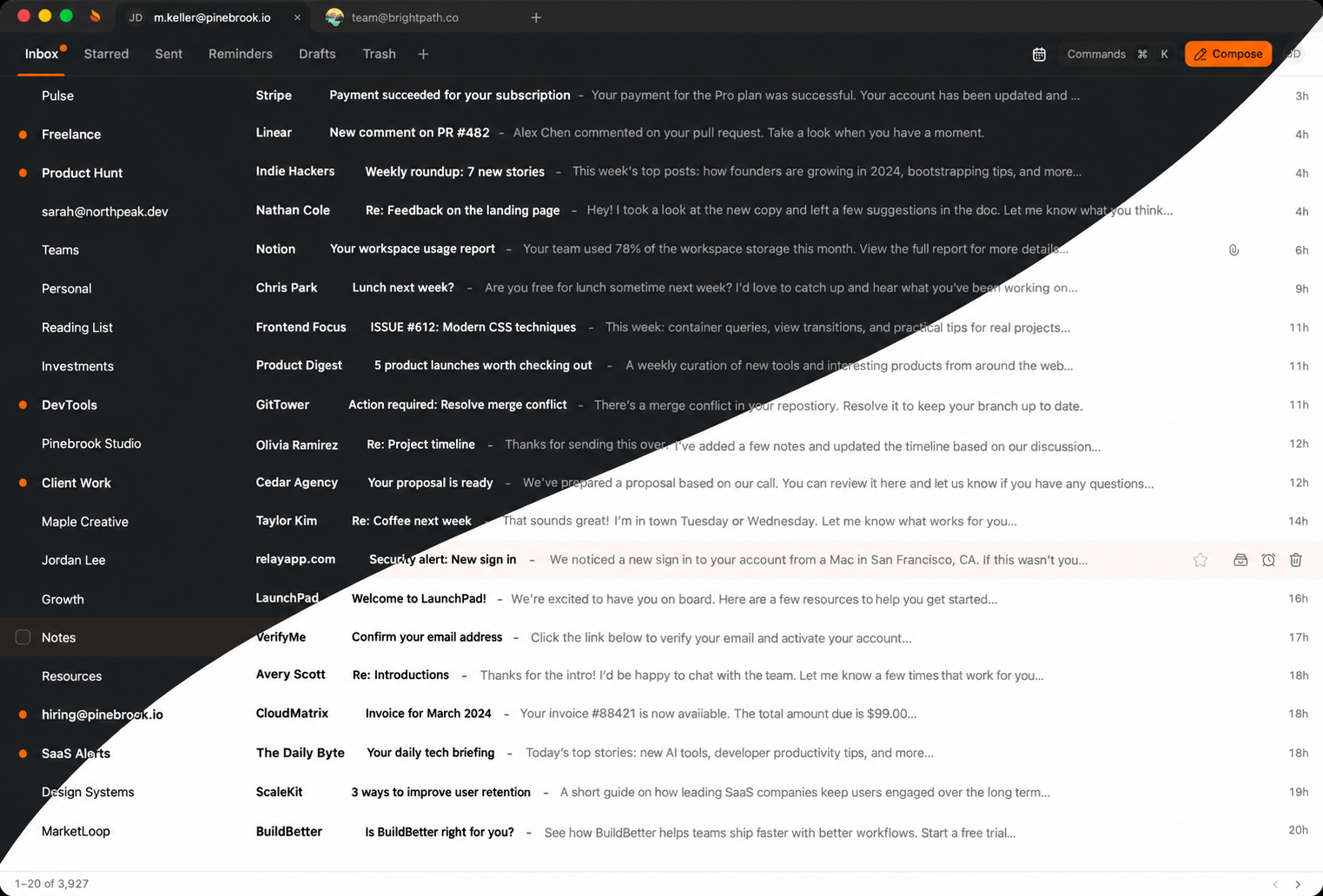
A small number of people have been testing Dodosend, and the feedback has been good so far.
More importantly for me, I got it to the point where it behaves like an actual email client rather than a prototype of one.
It also gave me a chance to reuse a lot of what I learned while working on Warmest, but with much clearer control over the product and the technical decisions.
What I learned
One thing I thought about a lot while building Dodosend was how I want to use AI when programming.
I use AI a lot, and this project was built at a time where it had become very easy to let an agent write larger and larger parts of a codebase.
What I noticed is that there is a point where this becomes uncomfortable for me.
If enough code gets generated without me paying attention to its structure, I can still have a codebase that technically works, but I stop having a good mental model of it. I open a file and understand the code in front of me, but I don’t immediately understand why that file exists, why something has that name, or where I should look when I want to change something.
I don’t like that feeling.
I’ve also never been particularly interested in following one definition of “clean code”. There are obviously principles that make software objectively easier to work with, but there is also a lot that comes down to how a particular person thinks about a system.
For me, naming and architecture are a big part of that.
So my approach became: let AI help with implementation, but keep the shape of the system mine.
I usually decide the architecture, boundaries, terminology, and how things relate to each other. AI can then do a lot of the mechanical work inside those constraints.
It doesn’t really make the AI slower, but it makes a huge difference when I come back later and need to understand the code myself.
Dodosend also reinforced a few other things for me.
Product context matters just as much as implementation. Warmest wasn’t stopped because the idea was impossible to build; priorities changed and the timing changed.
I also learned that coming back to an old idea can sometimes be much easier than trying to preserve the original project. Starting again meant I could keep what I had learned while throwing away assumptions that no longer made sense.
And for productivity software specifically, I’ve come to think of keyboard interaction as part of the product architecture, not just polish you add near the end. Once shortcuts, focus behavior, command discovery, and navigation are designed as one system, the application feels completely different.